
Once logged in, click the Profile icon in the upper right corner of your account.
Hover over Scheme and the menu will appear.
There are two main themes available: Dark and Light.
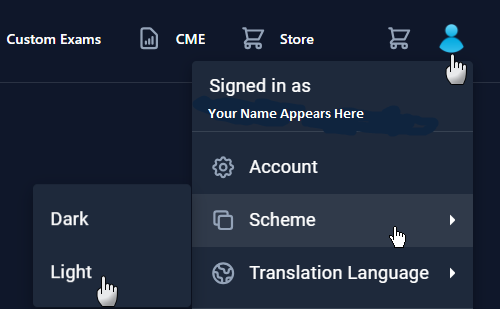
Setting is saved in your Profile.
Whatever you’ve selected, that theme will be remembered and utilized until you change it again.
Notable Benefits of each Theme:
Dark Theme
- Less eye fatigue
- Improved activity focus
- Higher media contrast
- Uses less battery power
Light Theme
- Better readability
- “Normal” paper-like visuals
- Better in outdoor light
- Uses less ink on print
Not seeing it? You may need to clear your web browser cache.
FAQ
Q. I give up - how can I talk to a human?
A. Our Memphis based team is happy to help - we're here from 8 AM to 5 PM CST Monday through Friday. Call us at 1-800-676-0822 Option 2 or contact us via our Support Form.