
You need a standard web browser to use Med-Challenger online. No other software is needed.
To find out what operating system and web browser you have, click here.
Here are a list of popular browser options. Click a browser link to learn how to download it.
- Chrome - Recommended
- Safari (for Windows)
- Firefox
- Microsoft Edge
- Opera
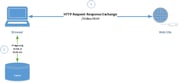
Figure: What is a browser cache?
Did you know?: If you use certain web products, you may need to clear your browser cache at times. Your "cache" - or cached files - are all the files (images, scripts, etc) that have been stored on your local device by your browser previously thereby reducing the need to re-download these files when you visit sites again. When websites make updates or changes, sometimes these cached files will become outdated. Clearing your cache will remove these files (i.e. "clearing your cache"). When you visit your destination website again, your browser will reload the destination website completely and save the most current files to your cache. All browsers do this in order to save load times on return visits to your frequented destinations.
FAQ
How do I clear my browser's cache?
Q. I've done all the stuff you say I should do but my account still looks wonky.
A. If you have used Med-Challenger before, your browser may still direct you to the older login page. Be sure to login at and update and cached links and/or bookmarks to: https://fuse.challengercme.com.
Q. I give up - how can I talk to a human?
A. Our Memphis based team is happy to help - we're here from 8 AM to 5 PM CST Monday through Friday. Call us at 1-800-676-0822 Option 2 or contact us via our Support Form.