Skip to content
English
  • There are no suggestions because the search field is empty.

Can I change my Med-Challenger password?

Yes, if you know your Med-Challenger username (usually your email address) and password and wish to change your password, follow these quick steps below. 

 If you are working on a desktop computer: 

If you are working on a mobile device:

  1. Login to your Med-Challenger Account.
  2. Click the Profile icon located in the UPPER RIGHT CORNER of your screen.
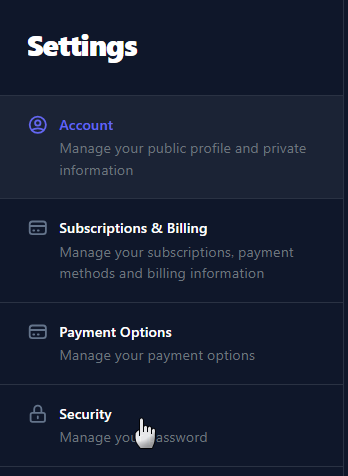
  3. Select Account, then open the Security tab. 
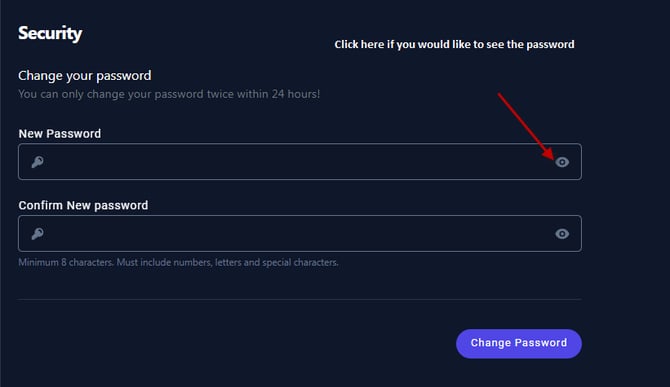
  4.  Enter your new password and confirm it, then select Change Password. 
  1. Login to your Med-Challenger Account.
  2. Tap your Profile icon.
  3. Select the three bars next to Account and choose Security at the bottom of the menu.
  4. Enter your new password and confirm it, then select Change Password.
Scroll Down For Screen Illustrations

  Passwords are case sensitive and must contain:

  • at least 8 characters
  • at least 1 number (numeral)
  • at least 1 uppercase letter

Profile Icon:
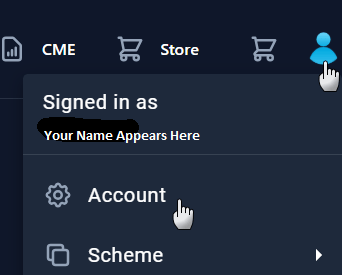

Selecting Your Med-Challenger My Profile Icon


Accessing Account:


Selecting Your Med-Challenger Account Settings


Change Password:Changing Your Med-Challenger Password

FAQ

I forgot Med-Challenger username.

I forgot my Med-Challenger password.

How do I log in to my Med-Challenger account?

Q: Can I reuse an old password?
A: No. For security, your new password should be different from your previous one.

Q: How long is the reset link valid?
A: Reset links expire after 24 hours. Request a new one if needed. If you request a reset link and don't receive it, please check your junk mail.

Q. I give up - how can I talk to a human?
A. Our Memphis based team is happy to help - we're here from 8 AM to 5 PM CST Monday through Friday. Call us at 1-800-676-0822 Option 2 or contact us via our Support Form.